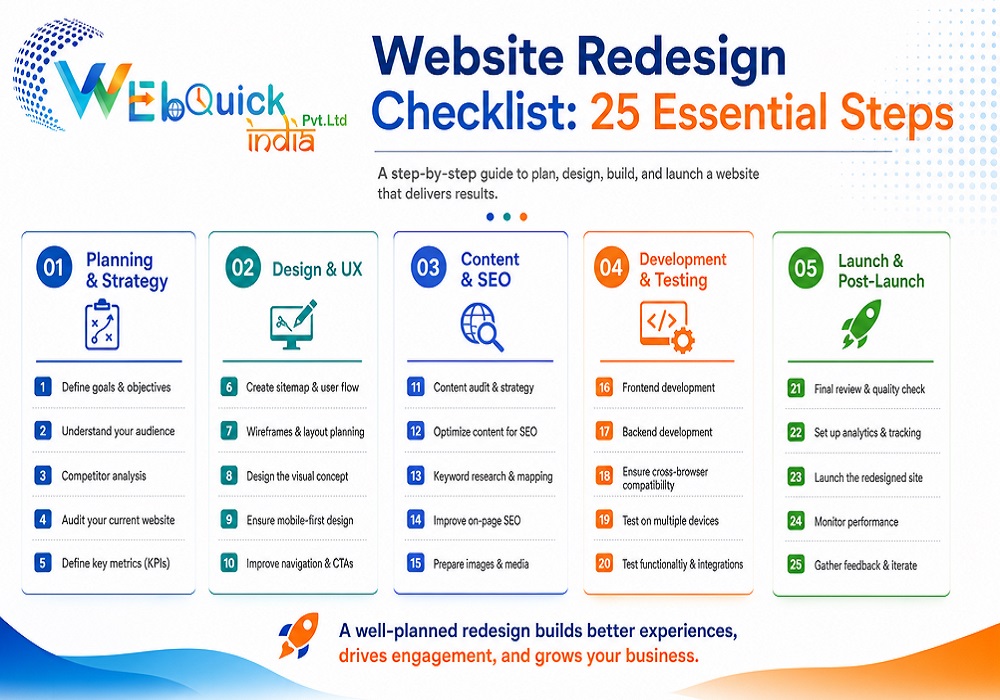
Website Redesign Checklist: 25 Essential Steps for a Successful Website Launch
Your website is usually the first place that visitors will see your business when they are searching for you online. This can turn off people and cost you leads if the design is outdated, it takes too long to load, the navigation is confusing, or it doesn't work well on a mobile device. No matter if you're a small business owner, an E-commerce brand, or a growing company, a detailed Website Redesign Checklist can assist you in making sure your new website is optimized for search engines and provides an elevated user experience.
A successful website redesign is not just about changing color or updating pictures. It's about optimizing for search engines, optimizing your website's usability, maximizing conversions, and making sure your website performs well in today's day and age. Webquick can assist businesses in redesigning their websites with a strategy that is geared toward both user and long-term search visibility.
This guide covers everything you should review before, during, and after redesigning your website.
What Is a Website Redesign?
A website redesign involves making changes to your current website, including updating its design, structure, content, functionality, and technical performance. A redesign is not just a mere visual overhaul of your website, but one that allows you to make a site easy to use, faster, more secure, and search engine-friendly.
A complete redesign may include:
- Improving mobile responsiveness
- Enhancing website speed
- Optimizing SEO elements
- Improving navigation
- Refreshing website content
- Including landing pages that convert
By following a Website Redesign Checklist, you will prevent common errors like losing your traffic, cracking critical pages, hurting your existing SEO ranking, and more.
Why Is a Website Redesign Important?
Technology and expectations of users are constantly evolving. A site that was successful three or four years ago might not be the same today.
A redesign by a professional can assist your business in the following ways:
- Improve Google rankings
- Increase website speed
- Build customer trust
- Generate more leads
- Improve user engagement
- Increase conversions
- Enhance your Web presence
Optimizing a website for search engines can lead to better organic rankings and user experience for businesses.
Signs Your Website Needs a Redesign
Not all sites need total overhauls, but these are signs that it is time to overhaul.
Your website is looking antiquated!
People decide whether or not to do business with you within a few seconds. An outmoded design can give the impression that your business is dead or not reliable.
Your Website Is Slow
A slow website leads to a high bounce rate and impacts search engine rankings. Always have optimizing speed as a part of your Website Redesign Checklist.
Poor Mobile Experience
The majority of users are browsing on mobile devices. The fact that your website isn't mobile-friendly is a sure way to lose visitors and potential customers.
Low Conversion Rate
If your website has visitors but few customers call, request quotes, or make purchases, your website's design and customer journey could be improved.
Declining Organic Traffic
Over time, outdated content, technical SEO problems, and website structure can result in less visibility in search engines.
Website Redesign Checklist Before You Start
The most crucial step in any redesign is planning. You could find yourself making hasty decisions regarding your development without a strategy that causes problems with your SEO and creates unnecessary costs.
Establish clear business objectives.
Identify what you would like your website to accomplish before you begin making changes.
Examples include:
- Increase online sales
- Generate more leads
- Improve local SEO
- Increase appointment bookings
- Improve brand awareness
All design decisions should be made with the goals of these objectives in mind.
2. Improve Existing Website Performance
Evaluate your current website by using the following tools:
- Google Analytics 4
- Google Search Console
- PageSpeed Insights
Check:
- Top-performing pages
- Traffic sources
- Bounce rate
- Conversion rate
- User behavior
- Most valuable keywords
This information will help you maintain what works.
3. Perform a Complete SEO Audit
One of the biggest mistakes businesses make is redesigning a website without understanding its current SEO performance.
Your audit should include:
- Indexed pages
- Meta titles
- Meta descriptions
- Heading structure
- Internal links
- Broken links
- Canonical tags
- XML Sitemap
- Robots.txt
- Core Web Vitals
- Structured data
A detailed SEO audit should always be included in your Website Redesign Checklist to protect existing rankings.
4. Back Up Your Website
Make full backups before making changes.
Your backup should contain:
- Website files
- Images
- Database
- Blog posts
- Landing pages
- Contact forms
- Product pages
In case of any unforeseen problems, you can return to the previous version.
5. Identify High-Performing Pages
You might find that some pages already attract traffic and may have a high rank in Google.
Make a list of pages containing:
- Highest organic traffic
- Most backlinks
- Best conversions
- Highest engagement
These pages should be preserved during the redesign process in case rankings are lost.
6. Develop a Content Inventory
Look at each page on your site and determine whether to:
- Keep it
- Update it
- Merge it
- Remove it
Keeping the information fresh enhances user experience, SEO performance, and ensures the content remains relevant and accurate.
Website Design & User Experience Checklist
While having a good-looking website is essential, it's not enough. Your website should offer intuitive navigation and be user-friendly so that visitors can easily find the information they need and take action. User experience improvements are always part of a well-planned Website Redesign Checklist.
Create a Simple Navigation
Your navigation should be simple, straightforward, and logical. There's no need for visitors to click several times to locate your services, pricing or contact information. Clear menus enhance usability and decrease bounce rates.
Optimize for Mobile Devices
Over 50% of traffic to websites is on mobile devices. While you are redesigning, make sure that each page is responsive and loads properly on all screens and provides a smooth browsing experience.
Improve Website Speed
A fast website page load will provide a good user experience and help to rank better in search engines. Optimize images, browser cache, unnecessary scripts, and optimize your code to load faster.
Strengthen Your Branding
Have uniformity of colors, typography, logos, and messaging throughout the page. A strong brand fosters trust and makes your business stand out in your customers' minds.
Optimize for Mobile Devices
More than half of website traffic comes from smartphones and tablets. During your redesign, ensure every page is fully responsive, loads correctly on all screen sizes, and offers a seamless browsing experience.
Improve Website Speed
Fast-loading websites create better user experiences and perform better in search engines. Compress images, enable browser caching, reduce unnecessary scripts, and optimize your code to improve loading times.
Strengthen Your Branding
Maintain consistent colors, typography, logos, and messaging across every page. Strong branding builds trust and makes your business more memorable.
Add Clear Call-to-Action Buttons
Every important page should guide visitors toward the next step.
Examples include:
- Request a Free Quote
- Contact Our Team
- Schedule a Consultation
- Get Started Today
Strategically placed CTAs help improve conversions and generate more leads.
SEO Website Redesign Checklist
One of the major reasons for losing rankings is that a redesign is not considered while implementing SEO. An SEO checklist will help you maintain what you have and develop opportunities for the future after a Website Redesign that focuses on SEO.
Preserve Existing URLs
Don't change the URL unless it's absolutely essential to do so. There may already be existing URLs that rank on Google and have great backlinks.
Set Up 301 Redirects
Make a permanent 301 redirect from the old page to the new page if the address of the page changes. This will help to keep the SEO value and avoid broken links.
Create the perfect Meta Titles and Descriptions
Each page should have:
- Unique title tag
- Engaging meta description
- Target keyword naturally included
These elements help boost the click-through from search results.
Update Heading Structure
One H1 heading for each page, with H2 and H3 headings for structuring content. A good heading hierarchy makes your content comprehensible to the user as well as search engines.
Improve Internal Linking
Use descriptive anchor text to link related pages. Internal links direct visitors to additional content and spread out the SEO juice throughout your site.
Optimize Images
Images large in size make websites slow. Optimize images for accessibility and search engine optimization (SEO) by using compressed images, descriptive filenames, and keyword-rich alt text.
Improve Core Web Vitals
Google considers page experience an important ranking factor. Focus on improving:
- Largest Contentful Paint (LCP)
- Cumulative Layout Shift (CLS)
- Interaction to Next Paint (INP)
Provide a new XML Sitemap
After your website is redesigned, upload the new XML sitemap to Google Search Console to get search engines to index new and updated pages as fast as possible.
Technical Website Redesign Checklist
Technical SEO is usually not considered while redesigning a site, but it is extremely important in terms of the site's overall performance.
Some things that should be checked before going live are as follows:
- SSL certificate working
- Canonical tag in place
- Robots.txt file is accessible
- Updated XML sitemap
- Structured data used
- 404 error fixed
- Broken links fixed
- Contact form working properly
- Analytics code in place
- Google Search Console verified
The technical optimization of a website makes it more accessible for search engines to crawl/index.
Website Testing Before Launch
Never publish a redesigned website without proper testing.
Review the following before launch:
- Test every page
- Check contact forms
- Verify CTA buttons
- Test mobile responsiveness
- Review navigation
- Check page speed
- Verify image quality
- Test payment process (if applicable)
- Validate schema markup
- Confirm all redirects are working
A thorough testing process helps prevent costly issues after launch.
Common Website Redesign Mistakes to Avoid
Even well-designed websites can lose traffic if common mistakes aren't avoided.
Some of the biggest redesign errors include:
- Ignoring SEO during redesign
- Removing high-ranking pages
- Forgetting 301 redirects
- Publishing duplicate content
- Slow page speed
- Poor mobile optimization
- Weak internal linking
- Broken forms
- Missing schema markup
- Not tracking website performance
Avoiding these mistakes helps protect your rankings and ensures a smooth transition.
Website Redesign Checklist (Quick Summary)
Before launching your redesigned website, make sure you have completed the following:
1. Define business goals
2. Analyze current website performance
3. Complete an SEO audit
4. Back up your website
5. Preserve important URLs
6. Improve website speed
7. Optimize mobile experience
8. Update website content
9. Improve navigation
10. Optimize metadata
11. Set up 301 redirects
12. Implement structured data
13. Test all forms
14. Connect Google Analytics
15. Submit XML Sitemap
Following this Website Redesign Checklist significantly reduces the risk of losing rankings while improving overall website performance.
Final Thoughts
Redesigning a website is not simply about coming up with something that looks current. A lot of consideration and preparation are needed when carrying out such a task. The website needs to be well planned, technically sound, and optimized for search engines. The best way for a business to come up with a fast, user-friendly, and SEO-optimized website that generates more leads is through the use of a comprehensive Website Redesign Checklist.
For businesses planning on redesigning their websites, working together with professionals can greatly help. Webquick offers services in SEO optimized website redesign, which helps businesses make their websites more visible on search engines.
Frequently Asked Questions (FAQs)
1. What should be included in a Website Redesign Checklist?
Goal setting, SEO audit, content update, website speed improvement, mobile usability, 301 redirects, technical SEO, testing, and post-launch monitoring should be included in a website redesign checklist.
2. How to redesign a website and keep my rankings in search engines?
You will have to maintain URL structure, make sure that you have 301 redirects in place, optimize your metadata, use internal links, and submit a new XML sitemap.
3. How often should a business redesign its website?
Most businesses should check how their website looks at least every 2–4 years or earlier depending on the situation.
4. Why SEO is critical during a website redesign process?
SEO will help you maintain your current ranking positions, organic traffic, improve crawlability, and perform well in search engines.
5. How long does a website redesign take?
Depending on the website size and complexity, it might take from 4 weeks to several months.
 our blog
 Webquick
India
Webquick
India
 31 Oct 2026








 How It works