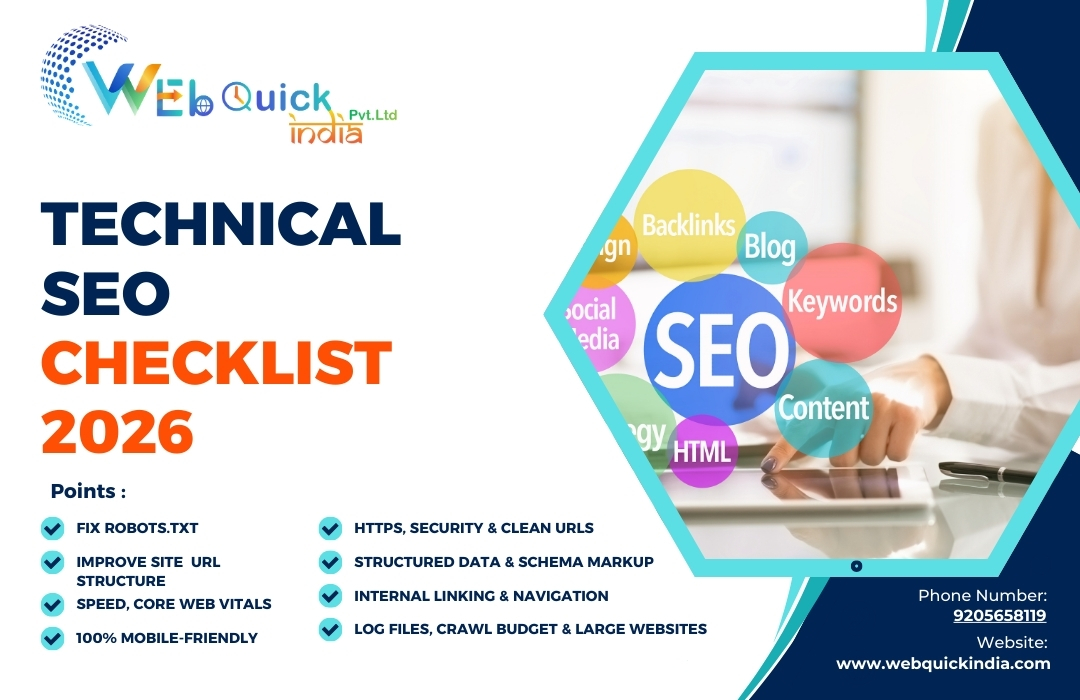
Technical SEO Checklist 2026: Complete Guide by Webquick India (Delhi)
In the case where your website provides excellent content but still has a low ranking on Google, the underlying issue is most likely technical SEO. Technical issues affecting a site such as slow loading pages, improper indexing, duplicate pages, broken links, or poor structure make it hard for search engines to crawl the site efficiently. The situation is that if Google is not able to crawl, index and understand your pages clearly, it will be very hard for them to list your website in search results, regardless of the quality of your content compared to others.
In this guide, Webquick India — a Digital Marketing Agency based in Delhi — is sharing a practical and updated technical SEO checklist that you can follow step by step. We’ve explained everything in simple language, with real examples, so beginners and professionals both can use it. Every point is aligned with the latest Google updates, Core Web Vitals, mobile-first indexing, and AI-driven search. By following this checklist, you’ll improve your website’s crawlability, indexing, performance, and overall ranking potential.
1. What Is Technical SEO (In Simple Words)?
Technical SEO refers to enhancing the backend of your website and its structure in a way that:
- Search engines are able to easily crawl your pages.
- They index only the proper versions.
- They comprehend your content.
- Users are provided with a speedy, secure, and mobile-friendly experience.
Google offers a definition of technical SEO as the process of letting the search engines to crawl, render, and index your content correctly without any difficulty.
Thus, consider technical SEO as the ground of your SEO house.
2. Why Technical SEO Matters Even More After Recent Google Updates
From 2024–2025, Google has:
- Rolled out core updates that strongly focus on helpful, high-quality content and demoting low-value/SEO-only content
- Introduced stricter spam policies (expired domains misuse, scaled low-quality content, etc.)
- Replaced FID with INP (Interaction to Next Paint) in Core Web Vitals – responsiveness of your site is now a ranking-related UX signal
- Pushed more towards AI-driven / generative search experiences, where structured data, clean architecture and fast pages help you become more “AI-friendly”
Technical SEO + Helpful Content + EEAT = Long-term SEO success.
This checklist SEO guide will help you align with these updates.
3. Run a Core Technical SEO Audit
Before anything can be repaired, it is important to identify the broken parts first.
3.1 Organize your technical SEO toolkit
Required minimum tools:
- Google Search Console – mainly used for crawl, index, Core Web Vitals, mobile usability
- Google Analytics – for measuring among others engagement & user behavior
- Technical analysis tool like Screaming Frog / Sitebulb / Semrush / Ahrefs, etc. (even free/limited versions would suffice)
3.2 Verify crawler and index status
To do this using Search Console:
1. Go to Indexing → Pages
2. Find out which URLs are Indexed and which are Not Indexed
Diagnose common problems:
- Crawled – presently not indexe
- Discovered – presently not indexed
- Robots.txt blockage
- Alternate page with valid canonical tag
Next steps:
- Indexing is mandatory for important pages (service pages, category pages, blogs)
- Noindex can be applied to thin, duplicate, tag pages, filters, etc.
- Resolve server errors (5xx) and avoid unnecessary redirects (3xx)
This is the real foundation of your SEO optimization checklist – without indexing, rankings are impossible.
4. Fix Robots.txt, XML Sitemap & Canonicals
These three directly control how search engines discover and understand your URLs.
4.1 Robots.txt – Don’t block what should rank
- File path: yourdomain.com/robots.txt
- Don’t block important sections like /services/, /blog/, /category/
- You can block:
- Admin panels (/wp-admin/, /cart/, /checkout/)
- Internal search result pages (/search/)
- Add your XML sitemap link:
- Sitemap: https://www.yourdomain.com/sitemap.xml
4.2 XML sitemap – Clean & updated
A good technical SEO checklist always includes a sitemap review:
- Include only canonical, live (200 OK) URLs
- Remove:
- 404 pages
- Redirected URLs
- No-index URLs
- Keep separate sitemaps for large sites: /blog-sitemap.xml, /product-sitemap.xml
- Submit it inside Search Console → Sitemaps
4.3 Canonical tags – Control duplicates
Use canonical tags to tell Google which version is “main”:
- Preferred URL:
<link rel="canonical" href="https://www.yourdomain.com/technical-seo-checklist/" />
- Avoid multiple URLs with same content:
- With/without trailing slash
- With parameters (?ref= etc.)
- E-commerce & filter pages especially need proper canonicals
This will prevent index bloat and help crawl budget, which is key for big sites in any checklist SEO plan.
5. Improve Site Architecture & URL Structure
A clear structure helps both users and search engines.
5.1 Logical hierarchy
Good example for a digital marketing agency like Webquick India:
- / (Home)
- /about-us/
- /services/
- /services/seo/
- /services/technical-seo/
- /services/social-media-marketing/
- /blog/
- /blog/technical-seo-checklist/
- /blog/on-page-seo-checklist/
Guidelines:
- Important pages should be within 3 clicks from homepage
- Use breadcrumb navigation for clarity
- Avoid deep nesting like /category/subcategory/another-level/another-level/page/
5.2 SEO-friendly URLs
- Short, descriptive, and keyword-focused
- Use hyphens (-), not underscores (_)
- Example good URL:
- https://www.webquickindia.com/blog/technical-seo-checklist/
- Avoid:
- https://www.webquickindia.com/blog/post?id=1234
A clean URL structure is a small but powerful part of your SEO optimization checklist.
6. Speed, Core Web Vitals & Performance
Google has made page experience & Core Web Vitals a big deal, and now INP is the main responsiveness metric.
6.1 Understand key metrics
Core Web Vitals include:
- LCP (Largest Contentful Paint) – how fast main content loads
- CLS (Cumulative Layout Shift) – how stable your layout is
- INP (Interaction to Next Paint) – how quickly page responds to user input
6.2 How to check
The tools you can use are:
- Page Speed Insights
- Search Console → Experience → Core Web Vitals
- Lighthouse in Chrome Dev Tools
6.3 Practical speed enhancements
- Adopt modern hosting & caching (Lite speed, Nginx, Cloud flare, etc.)
- Image compression and sizing performed correctly (WebP/AVIF where possible)
- Plugins/scripts with heavy usage removed
- CSS/JS minified and compression turned on (GZIP/ Brotli)
- Lazy loading for images and iframes implemented
In 2025–2026, a serious technical SEO checklist will not be complete without page speed and Core Web Vitals optimization being done.
7. Make Your Site 100% Mobile-Friendly
Google has a preference for mobile-first indexing, thus your mobile version is the primary one that Google notices.
7.1 Mobile Usability Testin
- The use of Google’s Mobile-Friendly Test or whenever-one’s-mobile-usability-reports would be beneficial
- Testing on actual devices (Android, iOS, various screen sizes)
7.2 Common Problems Solution
- Small font that cannot be read easily
- Elements that are clickable placed too closely
- Content that is wider than the display
- Pop-ups that are covering the main content (no intrusive interstitials)
A site that is mobile-optimized enhances the user experience as well as AI/voice search performance which in turn supports EEAT signals.
8. HTTPS, Security & Clean URLs
Google prefers secure, trustworthy sites – this ties with EEAT and overall ranking systems.
8.1 Use HTTPS everywhere
- Install SSL certificate (Let’s Encrypt, Cloud flare, or hosting provider)
- Redirect all HTTP → HTTPS with 301
- Ensure internal links also use HTTPS
8.2 Remove technical “noise”
- Fix broken links (404) – internal as well as external
- Clean redirect chains (a→b→c should be a→c directly)
- Avoid mixed content (HTTP resources on HTTPS pages)
8.3 Keep tech stack updated
- Regularly update CMS (WordPress, etc.), themes and plugins
- Use security plugins or WAF where needed
A trusted, secure website indirectly boosts your overall search performance.
9. Structured Data & Schema Markup (Very Important Now)
Structured data, accompanied by AI summaries and enriched results, is an impressive technical SEO strategy on every checklist.
9.1 What is structured data?
Structured data is a type of code (mainly in JSON-LD format) that provides a better understanding of the content by search engines, for example:
Organization (all relevant information about the company)
- Local Business (for improved local SEO, name, address, phone number, and business hours)
- Article / Blog Posting
- FAQ Page
- Product, Service, Review, etc.
9.2 Priority schemas for a digital marketing agency like Webquick India
- Organization or Local Business on homepage/contact page
- Service schema for key services (SEO, PPC, Social Media Marketing)
- Blog Posting for blog articles like this technical SEO checklist
- FAQ Page schema for FAQ sections on service pages
9.3 How to implement
- Use plugins (for WordPress – Rank Math, Yoast, etc.) or manual JSON-LD
- Test with Rich Results Test or Schema Markup Validator
Correct schema improves your eligibility for rich snippets, featured snippets and AI search experiences.
10. Internal Linking & Navigation
Technical SEO is not only for robots but also enhances the user experience.
10.1 Obvious internal linking
Make connections from pages with high authority (like your most popular blogs) to significant money pages
- Utilize anchor text that is descriptive and natural:
o Instead of "click here", say "technical SEO checklist" or "SEO services in Delhi"
- Insert contextual links between associated blogs (e.g., from On-page SEO Checklist to Technical SEO Checklist and vice versa)
10.2 User-friendly navigation
- Implement a simple top menu (Home, Services, About, Blog, Contact)
- Include footer links to crucial pages
- Implement breadcrumbs
It allows search engines to comprehend the structure of your site and the hierarchy of your content, which they consider a major SEO factor.
11. Log Files, Crawl Budget & Large Websites (Advanced)
For big websites (news, e-commerce, portals), go one step further.
11.1 Analyze server log files
- See how often Google bot visits which sections
- Identify:
- Wasted crawls on parameter URLs
- Repeated crawling of non-important pages
- Important pages crawled rarely
11.2 Optimize crawl budget
- Block useless parameters in robots.txt or Search Console’s URL parameters (where applicable)
- Canonicalize or noindex thin/duplicate pages
- Improve internal links to important pages so Google bot finds them easily
This advanced section completes your checklist SEO for enterprise-level sites.
12. Technical SEO for AI & Future-Proofing
The clarity and structure of your website are extremely important, now more than ever, with the utilization of AI-powered search and answer engines. Your emphasis should be on the:
- Direct and clear response content for users' questions
- Internal linking & topical clusters that are quite strong
- Soil structured data (FAQ, How To, Article, Product, Local Business)
- Fast, mobile-friendly, distraction-free user experience
If your site possesses strong technical aspects along with genuinely helpful content, the AI systems would be more likely to do the following:
- Capture your pages
- Include you in their AI answers/overviews
- Deliver you the traffic of better quality
13. Simple Technical SEO Checklist (Copy–Paste Friendly)
You can use this quick SEO optimization checklist for your next audit:
1. Crawl & Indexing
- Look at the difference between indexed and non-indexed URLs in Search Console
- Get rid of the noindex tags that are not necessary, server errors and blocked important URLs
2. Robots.txt & Sitemaps
- Do not block crucial areas
- Sitemap comprises only 200, canonical, Indexable URLs
- Submit it in Search Console
3. Site Structure & URLs
- Establish logical hierarchy with maximum 3 clicks deep
- Use clean, keyword-focused URLs
- Add breadcrumbs
4. Speed & Core Web Vitals
- Conduct tests with Page Speed Insights and Lighthouse
- Work on improving LCP, CLS, and INP
- Make images compress, CSS/JS minify, and use caching
5. Mobile-Friendliness
- Conduct Mobile-Friendly tests
- Resolve small text, tap targets, and layout issues
- Get rid of annoying pop-ups
6. Security & Technical Clean-Up
- HTTPS everywhere
- Repair broken links & redirect chains
- Always keep CMS and plugins updated
7. Structured Data / Schema
Include Organization/Local Business, Service, Blog Posting, FAQ Page schema
- Test with Rich Results Validation tools you can use are:
- Page Speed Insights
- Search Console → Experience → Core Web Vitals
- Lighthouse in Chrome Dev Tools
8.Internal Linking & Navigation
- Contextual internal links with descriptive anchors
- Clear main menu + footer + breadcrumbs
9.Advanced (Big Sites)
- Log file analysis
- Crawl budget optimization
14. How Webquick India Can Help
As a Digital Marketing & SEO agency based in Delhi, Webquick India can:
- Perform a detailed technical SEO audit for your website
- Fix crawling, indexing, speed, schema, and mobile issues
- Align your site with the latest Google algorithm updates, Core Web Vitals and AI search
- Build a long-term roadmap that covers technical SEO + content + EEAT
Frequently Asked Questions (FAQs)
1. What is technical SEO?
Technical SEO means improving the backend and structure of your website so Google can crawl, index, and understand your pages easily. It includes site speed, mobile-friendliness, XML sitemaps, robots.txt, Core Web Vitals, and structured data.
2. Why is technical SEO important if I already have good content?
Absolutely, content that is very good main won't rank if search engines can't properly sneak and catalog it.
3. How can I tell whether my site has technical SEO issues?
You can opt for tools like Google Search Console, PageSpeed Insights, Screaming Frog, or Ahrefs.
Some of the signs are: long loading time, pages not being indexed, 404 errors, copy content, or unexpected decreases in ranking.
4. Is it really true that website speed impacts SEO?
Definitely. Google takes into account Core Web Vitals (LCP, CLS, INP) for evaluating user experience.
Quick websites receive better ranks, more interactions, and fewer bounces.
5. What is crawl budget and why is it important?
Crawl budget is the frequency of Google crawling your website.
If you have a lot of repetitive or unnecessary pages, Google will spend time on them and possibly your important pages will not be indexed.
6. What is schema markup in technical SEO?
Schema (structured data) helps search engines understand your content.
It can enable rich results like FAQs, stars, breadcrumbs, and increases click-through rate.
 our blog

 Webquick
India
Webquick
India
 22 Oct 2026







 How It works